
Deskling
A desktop companion for Windows: a small robot called Scrap that walks along your window title bars, reacts to what you are doing, and helps with timers, notes, and reminders. Fully offline by default, with optional AI chat.
- Everything runs on your PC by default: no account, no key, no telemetry.
- Bring your own OpenAI key for AI chat, with hard daily and monthly budget caps.
- Hides itself during full-screen apps, presentations, and screen shares.
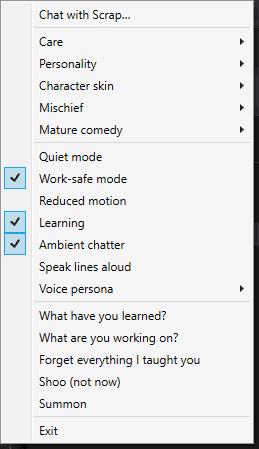
- It learns what you like, shows you what it learned, and forgets with one click.
The idea
Desktop pets used to be fun and then got in the way. Deskling is one that earns its spot on the screen. Scrap is a small, procedurally drawn robot that lives on top of your windows, has moods and a personality, and quietly helps out: timers, focus sessions, notes, reminders, and a shelf of recent downloads. It is fun when you want it and invisible when you don't.
What I built
A Windows app in C# on .NET 10, shipped as a single installer with no prerequisites.
- A living companion. Scrap floats on a transparent overlay where clicks pass through empty space. There are no sprite sheets: 66 behaviors and more than 35 animation routines (walking, sitting on windows, jumping between them, peeking from the screen edge, following or dodging the cursor) are chosen by a weighted scheduler that avoids repeating itself. Scrap hops onto the active window and reacts when you switch apps.
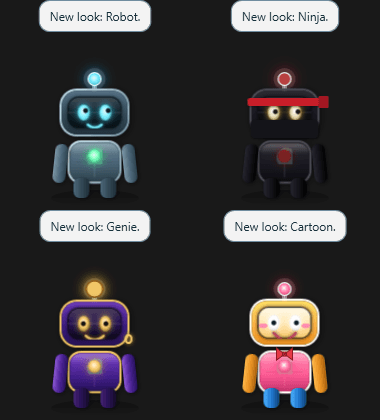
- Moods, care, and progression. Energy, fun, curiosity, and affection; nine care actions; XP, levels, daily quests, and a discovery journal. Four skins and several personality presets.
- Useful, not just cute. Timers and focus sessions that survive a restart, notes, and reminders that repeat daily, on weekdays, or weekly and are spoken aloud when due. An opt-in clipboard shelf that refuses to keep likely passwords and card numbers, a downloads watcher that only sees names, sizes, and types, and optional stretch reminders.
- Chat. A messenger-style window. An on-device brain handles greetings, the time, dice, quick math, pep talks, and commands like "start a 25 minute focus" or "note: buy milk". Short, in-character remarks about the app you are in and the time of day are generated on the device too, and can be read aloud in one of seven voices.
How it works
Local first, all the way down. All state lives in a versioned SQLite database in the user's own app data folder. Window tracking is event-driven through Win32 hooks rather than polling, and the app reads no browser history and injects into no other process. Presence detection hides Scrap and silences it during full-screen apps, games, presentations, and screen shares, so it never shows up on a projector or a call.
AI is optional and fenced in. With your own OpenAI key, the chat window sends your message, the recent conversation, and a one-line note about Scrap's mood to the Responses API for free-form replies. Files, clipboard, window contents, and notes are never sent. The reply must match a strict JSON schema, and the model can ask for only three things: start a timer, start a focus session, or save a note, each validated by the app. A budget service caps requests per day and tokens and dollars per month. A missing key, no internet, a reached budget, an API error, or an invalid reply all fall back to the on-device brain, so chat always works.
The key never touches a file. It is read only from a user environment variable, which the installer can set for you and the uninstaller removes. It is never written to the settings file or the database.
Learning you can see and undo. Scrap reinforces the behaviors you reward, slowly shifts its personality from how you treat it, and paces itself to your active hours. The changes are bounded and reversible, a "What have you learned?" panel shows all of it, and one click makes it forget.
Easy to install, easy to build. The installer needs no administrator rights, adds Start-menu shortcuts and an optional start-with-Windows, and asks on uninstall whether to keep your companion's data. A portable zip is available too. The scheduling, learning, presence, reminder, and download engines are pure code with xUnit tests, and one script builds the installer from a clean Windows machine.
Try it
Deskling is in early alpha (0.1.0) and free to download from the downloads page. It runs on Windows 10 (version 1809 or later) and Windows 11. The installer is not code-signed yet, so SmartScreen may warn: choose More info, then Run anyway.
To turn on AI chat, create an OpenAI API key at platform.openai.com and paste it on the installer's "Optional: cloud AI chat" page, or set it later in PowerShell:
[Environment]::SetEnvironmentVariable("DESKLING_OPENAI_API_KEY", "sk-...", "User")Then exit Deskling from the tray and start it again. Chat with Scrap shows which brain is in use. Setting a monthly budget on your OpenAI project is a good backstop, and the model and limits can be changed from Start menu → Deskling → Edit AI Settings.